Available overlays
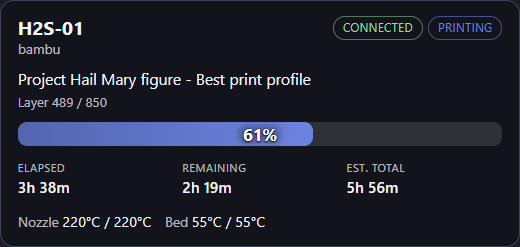
Bridge serves OBS-ready widgets under /bridge/… on the local API (default http://127.0.0.1:29067). Overview, Compact, and Bar use the Bridge WebSocket (/v1/events) so remaining time updates smoothly; Status and Progress poll HTTP.
Use a separate OBS Browser Source per printer, each with its own printer= id.
Catalog
| Overlay | Browser Source URL | Recommended size | What it shows |
|---|---|---|---|
| Overview | http://127.0.0.1:29067/bridge/overview/ |
520 × 270 | Name, connection, print state, job, layers, progress bar with centered %, elapsed / remaining / est. total, temps |
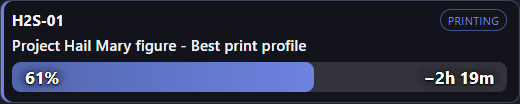
| Compact | http://127.0.0.1:29067/bridge/compact/ |
520 × 130 | Name, print-state badge, job name, progress bar with % and remaining time on the bar |
| Bar | http://127.0.0.1:29067/bridge/bar/ |
1920 × 36 (full canvas width × ~36) | Full-width edge strip: Layer current/total on the left, % centered, remaining on the right. Text hides automatically if the source is shorter than ~30px |
| Status | http://127.0.0.1:29067/bridge/status/ |
420 × 140 | Name, connection, print state (HTTP poll) |
| Progress | http://127.0.0.1:29067/bridge/progress/ |
480 × 160 | Job name, progress bar, remaining (HTTP poll) |

Bar is meant to sit flush on the top or bottom of the scene. Percentage stays in the center so it remains readable if the stream crop or safe area clips the sides.
Append ?printer=YOUR_PRINTER_ID. Copy ready-made links from Printers → Details in Bridge.
Query parameters
| Parameter | Default | Purpose |
|---|---|---|
printer |
(first printer) | Printer instance id (required when you run more than one) |
theme |
dark |
Widget appearance: dark or light |
host |
(same origin when served by Bridge) | Optional Bridge API base — only needed for custom pages not served by Bridge |
token |
(none) | Optional API token |
interval |
2000 |
Poll interval for Status / Progress only (ms) |
Examples:
http://127.0.0.1:29067/bridge/overview/?printer=PRINTER_A_ID
http://127.0.0.1:29067/bridge/compact/?printer=PRINTER_B_ID&theme=light
http://127.0.0.1:29067/bridge/bar/?printer=PRINTER_A_ID
Time fields
Bridge exposes job timing on status as:
job.elapsed_secondsjob.remaining_secondsjob.total_seconds(estimated)job.progress(0–100)job.layer_current/job.layer_total(when the printer reports layers)
Overview, Compact, and Bar refresh from WebSocket events and tick remaining/elapsed locally between updates. If a plugin only sends progress + remaining, the client derives the other times when possible.
Next
- Configure in OBS
- Custom overlays — drop your own HTML into Bridge’s
overlays/customfolder - Overlay developer docs — build with
fetch/WebSocket